Reading the word groups and the map
Ingence looks for experiments that share words. It shows what it found in three places, all in Advanced. They are the Word groups section, the Map of groups, and a comparison of groups side by side. This guide says what each picture means, one mark at a time.
The pictures come from the sample laboratory that ingence demo makes, so every word in them is
invented. In the Dashboard, each of the three views has a How to read this link beside its
heading. It opens the same picture and the same list in place. The picture opens only when you ask,
and opening it doesn’t change anything.
What a word group is
An experiment’s words come from its folder’s name and from the names of the files an instrument wrote in it. A setting can read every file’s name instead, or the folder’s name alone. Ingence leaves out words that do not say what an experiment is about. These are a word of one letter, a word with a digit, a date and a replicate’s word. By default it also leaves out a word that names a stage, and a word that only joins other words.
A word group is a set of words that several experiments share. Each of them has every word in the set. Ingence finds every such set. It asks you about the sets that enough experiments have (5 by default). It starts with the set most experiments share, then asks about each set that adds words to it. So by default it never asks about a word an experiment lacks.
One group says that the experiments with those words are one group. Not one group says they are not. Ingence saves either answer in the answer log under your name. The next scan draws the groups from your answers. Each experiment stays an experiment of its own: a group never merges two of them.
Reading the word groups
Open Advanced, then Word groups. Each word group is one set of words, with the sets that add words to it above it.
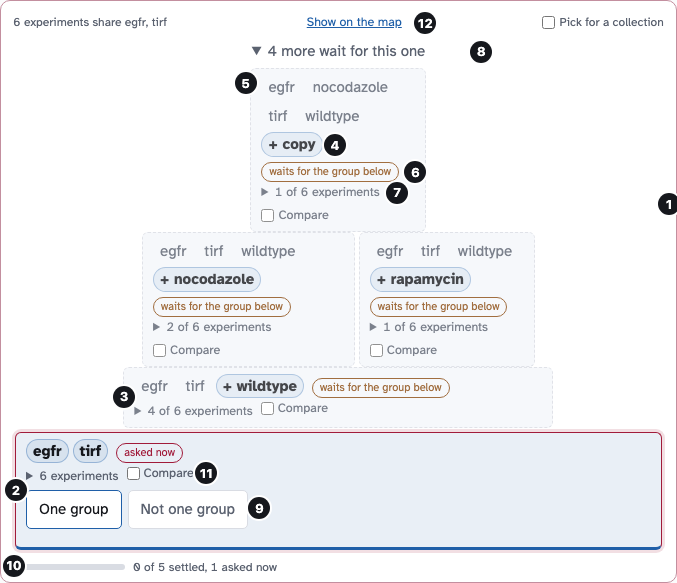
One word group from the sample laboratory: the base block, the blocks above it, and the line that folds them. Select the picture to see it at full size.
A word group. A set of words that enough experiments share, 5 by default, with the groups that add words above it. The top line says how many experiments have the base words.
The base. The base block is the set every experiment in the group has. It is at the bottom, as wide as the group, and all its words are strong.
A block above. A block on another block adds words to the one below. Its width is its share of the base’s experiments; point at it to outline the block it adds to.
A strong word. A word in a bold pill with a plus sign is one this block adds to the block below it.
A faint word. A gray word is one the block shares with the block below it. It is not new here.
The state. The tag says where the block stands: asked now, one group, not one group, waiting, or not asked. The edge shows the same with a glow, green, dashes or faded words.
How many experiments. How many of the base’s experiments have this block’s words. Open it to see their folders.
Blocks that only wait. Blocks that wait for the block below them fold into one line, so a tall group stays short. In this picture the line is open.
Your answer. Only a block asked now has these. Ingence saves One group or Not one group in the answer log under your name.
The meter. The bar counts the blocks in the group that are settled, out of all of them. Settled means approved, declined, or set aside because a block below was declined.
Compare. Tick 2 to 4 blocks, in this group or another, to see their words, experiments and files side by side. Ticking saves nothing.
Show on the map. Opens the Map of groups with this group’s experiments outlined and zoomed in.
Ingence does not ask about word groups that too few experiments share. They are listed under the others, each with its number.
Reading the map
Open Advanced, then Map of groups. Each dot is one experiment, placed by the words its theme uses. A theme is a set of experiments that share many words. Ingence finds themes itself. The picture shows the map with two groups outlined, which is what Show on the map draws.
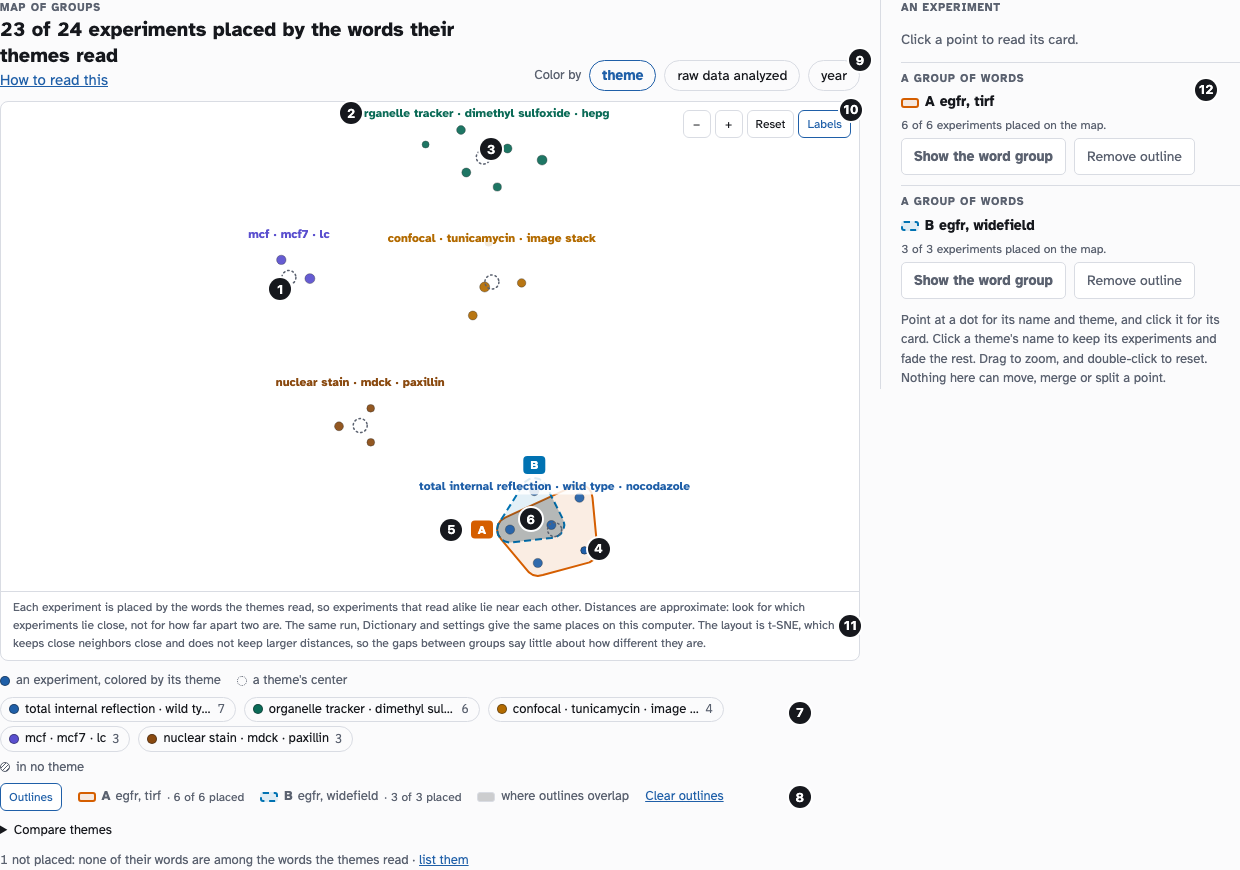
The map of the sample laboratory with two groups outlined. Select the picture to see it at full size.
An experiment. One dot is one experiment. Its color is the measure under Color by, and its size grows with its number of files.
A theme. Each theme is named once, above the middle of its experiments. Click a name to keep that theme’s experiments and fade the rest.
A dotted ring. The ring marks the middle of a theme’s experiments, the average of their places. It is not an experiment.
An outline. A group’s outline is the smallest round shape around its experiments. A dot of another group can lie inside it.
The letter. The letter at an outline’s edge names the group in the key and in the comparison.
Where outlines overlap. The gray part is where two outlines meet. It can hold a dot that is in neither group.
The colors. The key under the map says what each dot color stands for. Hatching is an experiment with no value for the measure.
The outlines’ key. The Outlines button shows or hides the outlines. The key lists each outline with its letter, words and placed experiments.
Color by. Chooses what a dot’s color means: its theme, how much of its raw data was analyzed, or its year.
Zoom and names. Zoom in, zoom out or reset, and show or hide the names. Drag on the map to zoom to a box, and double-click to reset.
What the places mean. Ingence’s own sentence on how it made the places, and what they do not say.
The groups outlined. Each group outlined, how many of its experiments have a place, and a way to remove its outline. Click a dot to see that experiment’s card here.
An experiment with none of the words the themes use has no place. Ingence does not draw it and counts it under the map.
Comparing groups
To compare, tick Compare on 2 to 4 word groups under Word groups. You can add a theme from the list that appears (Add a theme…). On the map, tick 2 to 4 themes under Compare themes. Then press the button that counts them, such as Compare 2 groups or Compare 2 themes. Comparing doesn’t save anything.
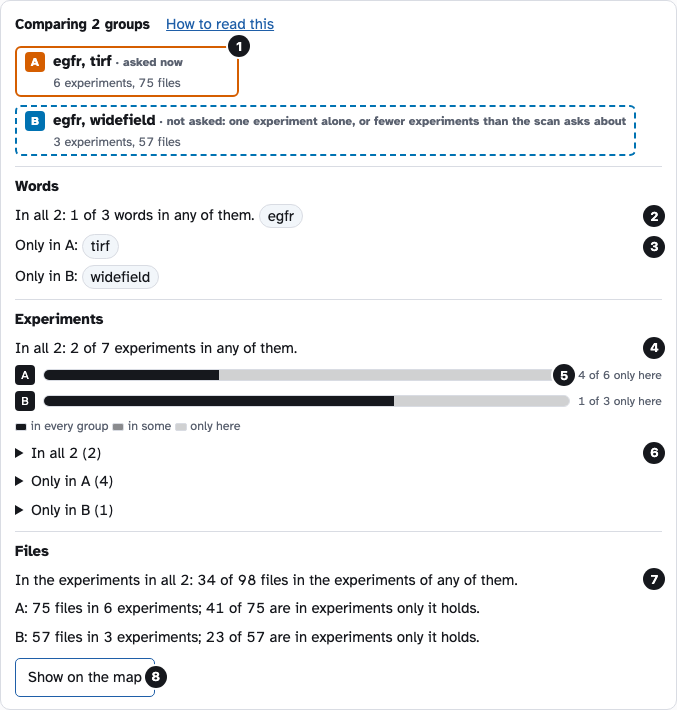
A comparison of two sets of words from the sample laboratory. Select the picture to see it at full size.
The groups. Each group with its letter, what it is, and how many experiments and files it holds. A letter’s box has the same dash as its outline on the map.
Words in all. The words every group has, out of all the words any group has.
Words in one only. The words only that group has. A group with none says none.
Experiments in all. How many experiments are in every group, out of all the experiments in any group.
The bars. One bar for each group’s experiments: dark are in every group, middle in some, light in that group only. The number beside it counts the light part.
The lists. Each list is closed until you open it. It shows the experiments in every group, or in one only, with their numbers of files.
Files. The files of the experiments in every group, out of the files of the experiments in any group. Shared files are the files of shared experiments.
Show on the map. Opens the Map of groups with each group outlined with its letter, and the overlap shaded.
With 3 or 4 groups, the comparison also lists what each 2 groups share.
A word group under Word groups has the same Show on the map button. On the map, the card of an outlined word group has Show the word group. It goes back to that word group, open and marked.
Outlines and places on the map
An outline shows where a group’s experiments lie. A dot inside an outline is not always in that group. A dot of another group can lie inside an outline. A shaded overlap can hold a dot that belongs to neither group. The places on the map are approximate. Read which experiments lie near each other, and ignore exact distances.