Use Ingence with an AI agent
Ingence doesn’t use a language model. It gives your agent a summary at the level you choose, never your files’ contents. Your agent’s answers enter a project only when you import them.
An AI agent is a program, built on a language model, that works on tasks you give it. This page is for people who already use one. You do not need one to use Ingence.
Choose a level
The level says how much the summary names. Each level adds to the one before it. The default is
words.
Level |
What the summary holds |
|---|---|
|
Numbers only. |
|
Also the meanings from the Dictionary, theme labels made of those meanings, the names of your own collections and goals, and short names for experiments: E1, E2, E3 and so on. |
|
Also the experiments’ names, the areas’ names and the words that are not in the Dictionary. |
|
Also each file’s path inside its data folder, and file names. |
At every level, a summary leaves out the contents of your files and their full paths. It also leaves out user names, computer names, your notes and your name.
Write a summary
ingence export brief --level words
Run it in the project’s folder, or add --project and the project’s folder (this command doesn’t
take -p). It writes three files and prints where they are:
brief.md, the summary to read. Give this file to your agent.brief.json, the same summary for a program.brief.aliases.json, which links each short name, such as E1, to the project’s own identifier. Ingence keeps it apart from the summary.
Without --out, Ingence writes them in the project, in the folder projections/exports/brief.
--levelchooses the level.--budgetsets the most the summary can hold, in tokens. A token is about 4 characters of text. The default is--budget 4000. When the summary is too long, Ingence leaves out experiments first.--outchooses the folder to write into.--out -prints the summary in the terminal.
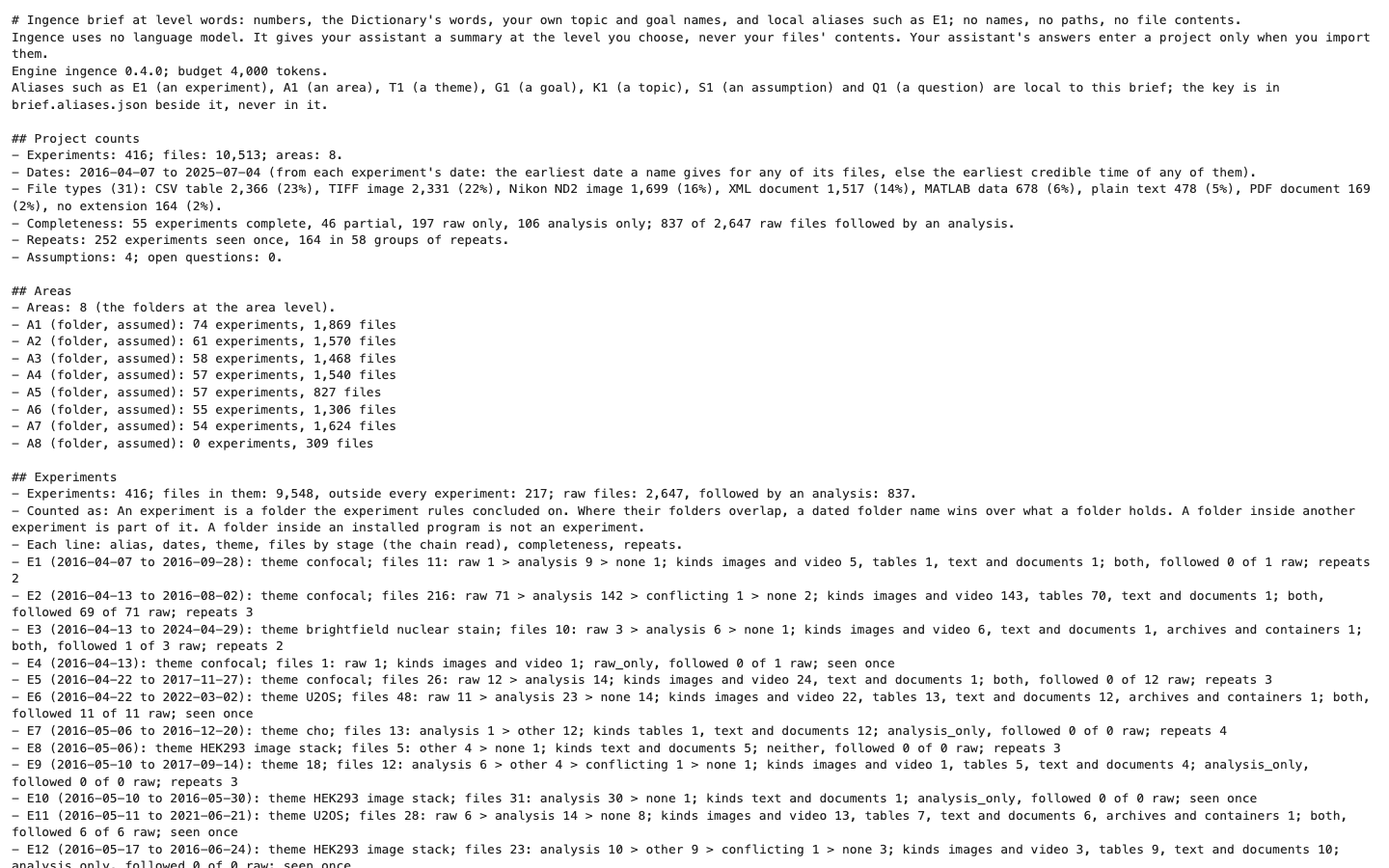
The first lines of a summary at the words level.
Let an agent ask questions
Some agents can use the Model Context Protocol (MCP), a standard way for an agent to ask a program
questions. ingence mcp answers them about one project, at the level you choose:
ingence mcp -p <project> --level words
Your agent starts this command itself. MCP says how to add it to your agent, and lists every question your agent can ask.
Bring answers back
Read every answer before you import it.
In the Dashboard, Import reads a file of answers (Answers from a colleague). Under “Who wrote it”, choose “Agent-generated”. Ingence then asks you to confirm that you reviewed every answer.
On the command line, ingence record import reads a comma-separated values (CSV) file. One example
is the table that Export writes on Word groups, in Advanced:
ingence record import answers.csv --agent-generated --reviewed -p <project>
--agent-generated says that an agent wrote the answers. --reviewed says that you read every
answer.
Both ways, the answer log keeps each answer under your name, with _agent after it. The answers
wait for Re-run, as yours do.